Terms of use, and the questions that come before them.
Plain terms for a one-time purchase, followed by the questions we are asked most often.
Last updated 7 September 2026
Terms of Use
Buying Scrub Data gives you a personal, non-transferable licence to use the app on the devices tied to your Apple Account, under the App Store terms you already accepted at purchase.
There is no subscription and no in-app purchase. Refunds are handled by Apple through the App Store, not by the developer.
The developer claims no rights over any file you inspect or scrub, and has no access to them.
Scrub Data removes the metadata fields it lists in the report for the formats it supports. It does not claim to remove information contained in the image itself, such as a street sign or a face.
The app is provided as is. Always keep your original file until you have checked the scrubbed copy, and do not rely on the app as the sole safeguard in a situation where exposure would cause you harm.
To the extent permitted by law, the developer is not liable for indirect or consequential loss arising from use of the app. Nothing here limits rights you have under consumer law in your country.
Do not use Scrub Data to remove metadata in order to obstruct a legal process, or to alter files you do not have the right to alter.
These terms may change when the app changes. The revision date at the top of this page will always reflect the current version.
Frequently asked questions
Does Scrub Data work without a connection?
Yes. The app contains no networking code and performs every read and write on the device, so it behaves identically in Airplane Mode. The one exception is Apple's map view on the inspection screen, which fetches map tiles from Apple when it is shown.
Are my originals modified?
No. Scrub Data writes a new, clean file and leaves the original exactly as it was, including its metadata.
What is the difference between the two modes?
Remove all data strips every field the format allows, including orientation and colour profile. Privacy essentials removes location, device and timing information but keeps those two display fields, so the photo still looks correct everywhere.
Can it remove metadata from a screenshot or a downloaded image?
Yes, provided the file is HEIC, JPEG, PNG or TIFF. Screenshots usually carry far less metadata to begin with.
Does it strip metadata from videos?
Not in this version. Scrub Data handles still images only.
What does the risk score actually measure?
It weights the fields found in the file by how much they expose: location fields count for most, device fields next, timing least. It is a summary of the list beneath it, not an independent judgement about the photo.
Why does a scrubbed photo still show a date in Photos?
The Photos app keeps its own database entry for the file, separate from the metadata inside it. Anyone you send the file to sees only what the file carries.
Is any of my data collected for analytics?
None. There are no SDKs, no advertising identifier and no crash reporting. The privacy page describes this in full.
What happens to my stats if I delete or reinstall the app?
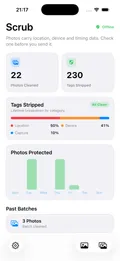
Everything is stored 100% locally on your device, in your iPhone's secure on-device storage. Scrub does not use accounts, cloud syncing, or database servers. Because your stats — photos cleaned, fields removed, and weekly history — live strictly on your phone, deleting or reinstalling the app will wipe your local statistics and reset your counters to zero.
How many photos can a batch hold?
Up to fifty per pass, in any mix of supported formats.
Still stuck? Support has troubleshooting and an email address. Data handling is described on the privacy page.